
You're probably seeing the same pattern many instrument students run into. The airplane has a bright screen, a moving map, magenta lines, and an autopilot that seems happy to do the hard work. Then ATC gives you a reroute, the box flashes a message you didn't expect, and suddenly the cockpit feels much smaller.
That's where flight management systems stop being “nice avionics” and become a discipline. A good pilot doesn't just know which buttons to press. A good pilot knows what the system is thinking, what it's using for data, what mode it's in, and what to do the moment it stops helping.
For general aviation pilots, that matters more than most training syllabi admit. A lot of pilots learn normal FMS operation. Far fewer practice failure, mismatch, or automation reversion in a structured way. That gap matters because the pilot is still the final authority, even when the airplane is doing a lot of the work.
Table of Contents
- What Is a Flight Management System
- The Core Components Inside the FMS
- Key Functions Demystified LNAV VNAV and Performance
- FMS in the Cockpit GA vs Airliners
- Practical FMS Training and Simulator Scenarios
- A Pilot's Guide to Safely Buying an Airplane
- Conclusion Your Path to FMS Mastery
What Is a Flight Management System
A Flight Management System, or FMS, is the airplane's planning and guidance center. If you want a simple analogy, think of it as a car GPS, a flight planner, and a performance engineer rolled into one system. It doesn't just tell you where to go. It helps determine how the aircraft should get there.
In practical cockpit terms, the FMS handles three big jobs. It builds the route, tracks the airplane's position along that route, and helps manage the aircraft's performance during climb, cruise, descent, and arrival. That's why pilots moving from simple VFR navigation into IFR operations quickly discover that the FMS is no longer optional knowledge.
The basic job of the system
The FMS takes pilot inputs and stored navigation data, then turns that into usable guidance. You enter an origin, destination, route segments, procedures, and performance information. The system then computes a path and supports navigation along it.
That sounds simple until you remember what used to replace it. Before widespread flight management systems, pilots relied much more heavily on manual calculations, separate navigation references, and paper charts for route management. Modern systems combine those tasks into a single workflow, which is one reason they've become standard equipment across commercial aviation and advanced business aircraft.
Practical rule: The FMS is not there to replace pilot judgment. It's there to organize data, reduce workload, and improve precision.
Why it matters in modern aviation
The technology has become so central that the market itself reflects how important it is. The global Flight Management Systems market was valued at USD 4.2 billion in 2025 and is projected to reach USD 6.8 billion by 2032, while North America holds over 35.5% of market share, driven by automation used to optimize flight paths and fuel consumption, according to IMARC's Flight Management Systems market analysis.
For a student pilot, those numbers aren't the main story. The main point is operational. If you plan to fly IFR, move into technically advanced aircraft, or transition toward commercial flying, you'll keep running into flight management systems in one form or another.
Where students usually get confused
Most confusion starts when pilots treat the FMS like a magic box. They learn the sequence for loading a route, but not the logic underneath it.
A better way to think about it is this:
- Route logic: The system needs a complete, sensible path.
- Position logic: It must know where the airplane is now.
- Guidance logic: It must know what mode you expect it to fly.
If any one of those breaks, your workload rises fast. That's why understanding beats memorizing.
The Core Components Inside the FMS
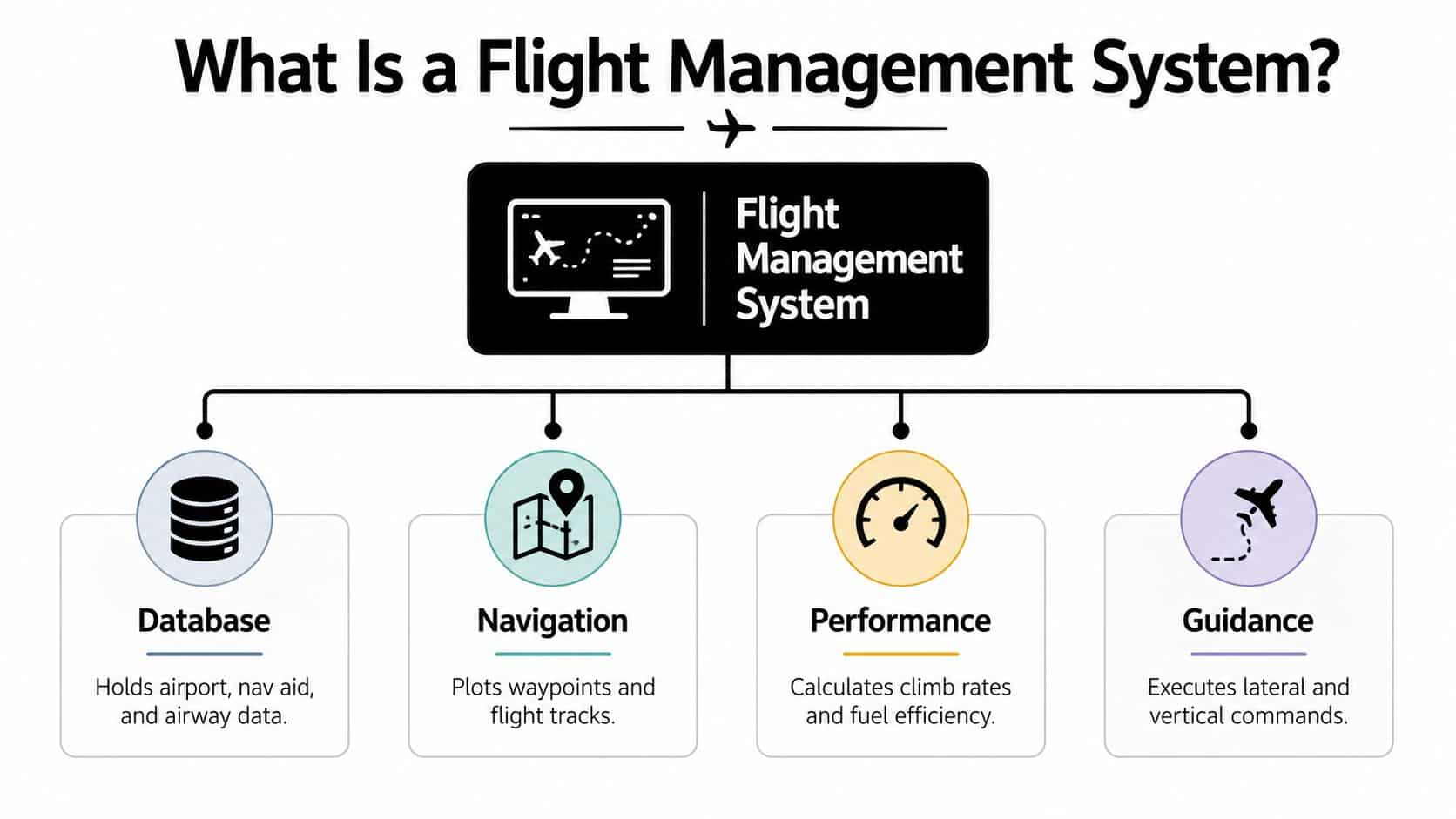
The FMS isn't one mysterious black box. It's a working relationship between computing hardware, pilot interface, and stored data. If you understand those parts separately, the system becomes much easier to manage when you're under pressure.
One useful baseline comes from Soma Software's overview of flight management systems, which describes three critical interrelated components: the Flight Management Computer, the Control Display Unit, and the navigation databases that must be updated regularly.
Flight Management Computer
The Flight Management Computer, or FMC, does the actual thinking. It performs the calculations for route construction, position solving, performance prediction, and guidance commands. When the airplane seems to “know” the next waypoint, expected fuel profile, or descent path, the FMC is doing that work.
Pilots sometimes miss this point because they never touch the computer directly. They interact with screens and keypads. But the FMC is the calculation engine behind those interfaces.
In simple terms, the FMC answers questions like these:
- Where is the aircraft in relation to the planned route?
- Which waypoint comes next?
- What altitude constraints apply?
- What path should the airplane follow to stay within the programmed profile?
Control Display Unit
The Control Display Unit, or CDU, is where the pilot meets the machine. It's the keyboard and display combination used to enter routes, review legs, select procedures, and confirm changes. In transport aircraft it's usually text-heavy. In many general aviation systems, the same idea appears through softkeys, knobs, touchscreen controls, or menu-driven displays.
The important habit is this. Don't confuse the entry device with the actual logic engine. The CDU is how you talk to the FMS. It isn't the FMS itself.
A fast pilot can enter data quickly. A disciplined pilot verifies every page, every transition, and every discontinuity before execution.
Navigation and performance databases
The database is the quiet part of the system, but it's foundational. It contains airports, navaids, waypoints, airways, procedures, and aircraft performance information. If that database is out of date or corrupted, the FMS can still appear polished while feeding you bad assumptions.
That's one reason experienced IFR pilots always ask a plain question before launch: is the database current, and does the route make sense independent of the box?
How the pieces work together
A clean way to picture the system is this table:
| Component | Pilot sees | Real job |
|---|---|---|
| FMC | Guidance results | Computes route, position, and performance |
| CDU | Keys, menus, pages | Lets the pilot enter and review data |
| Database | Procedures and waypoints on screen | Supplies the reference information the system uses |
When a route change causes confusion, one of those three areas is usually the culprit. The pilot may have entered something incorrectly through the CDU, the FMC may be sequencing differently than expected, or the database may not match what the pilot assumed.
That's why good FMS use always includes cross-checking. You don't just load. You load, verify, and monitor.
Key Functions Demystified LNAV VNAV and Performance
Most pilots first meet the FMS through mode names. LNAV. VNAV. Maybe a performance page with speed targets and fuel predictions. Those labels can feel abstract until you tie them to what the airplane does.
Start with one idea. The FMS doesn't fly “smartly” just because the route is in the box. It flies according to the modes you arm, the data you entered, and the guidance source the system is using.
LNAV means lateral path control
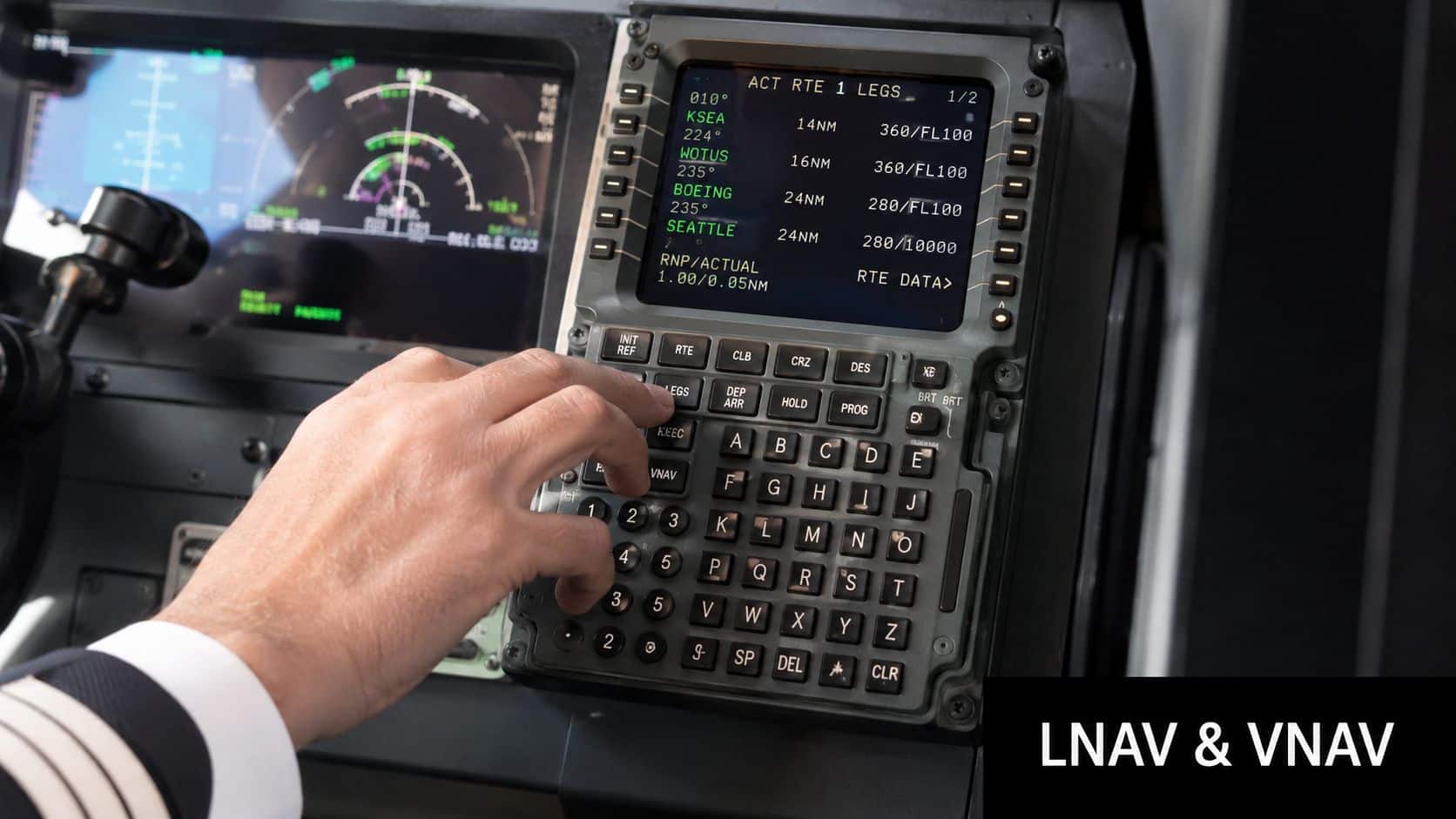
LNAV, or lateral navigation, is the part that keeps the airplane on the horizontal route. If your flight plan goes from one fix to the next, LNAV is the guidance function that tells the autopilot or flight director how to follow that path.
A practical example helps. Suppose you're flying an IFR cross-country with a departure, an airway segment, a direct clearance, and an instrument approach loaded. LNAV helps sequence each leg and command turns at the right time, assuming the route was built correctly and activated as intended.
Modern systems are able to do that with a high degree of precision because they integrate multiple navigation inputs. As described in Wikipedia's technical overview of the flight management system, modern FMS use dual redundant Flight Management Computers that continuously integrate GPS and Inertial Reference System data and communicate directly with the autopilot for lateral and vertical guidance.
VNAV means vertical path management
VNAV, or vertical navigation, deals with altitude and descent planning. It is with VNAV that many students either love the system or distrust it completely.
When VNAV is working well, it can help plan climbs, level-offs, and descents to satisfy altitude restrictions more smoothly than many pilots can do mentally while also handling radios, weather, and traffic. But it only works well when the route and altitude constraints are entered correctly.
Here's the trap. Pilots often assume VNAV “knows” the clearance. It doesn't. It knows the programmed profile.
If ATC changes one crossing restriction and you don't update the FMS correctly, VNAV may fly a profile that's perfectly logical to the computer and completely wrong for your clearance.
Performance pages are planning tools
Performance functions turn the FMS from a navigator into a planning assistant. These pages may include speeds, fuel estimates, climb data, and descent logic. In some aircraft, pilots can also use cost index and other inputs to shape how the system balances time and fuel.
That doesn't remove the need to understand aircraft performance manually. It means you now have another tool to compare against your own planning. If you want to sharpen that side of your flying, a good refresher on aircraft performance charts and what they actually tell you helps connect the digital outputs to the real airplane.
What students should monitor in flight
The useful question in cruise isn't “Is the autopilot on?” It's “What is the system commanding right now, and why?”
A good in-flight scan includes:
- Active lateral mode: Is it in LNAV or some other roll mode?
- Active vertical mode: Is VNAV commanding the path you expect?
- Next fix logic: Has the FMS sequenced to the correct leg?
- Pilot cross-check: Does the airplane's movement match the clearance and chart?
That's how you stay ahead of automation instead of becoming its passenger.
FMS in the Cockpit GA vs Airliners
A general aviation pilot stepping into an airliner later won't be learning a completely new philosophy. The core ideas stay familiar. Build the route. Verify the legs. Manage lateral and vertical guidance. Monitor the modes. What changes is the depth, interface, and procedural discipline.
That matters because many students think their GA avionics are “small airplane tools” and airline systems are something separate. They aren't separate. They're cousins.
What feels different in GA
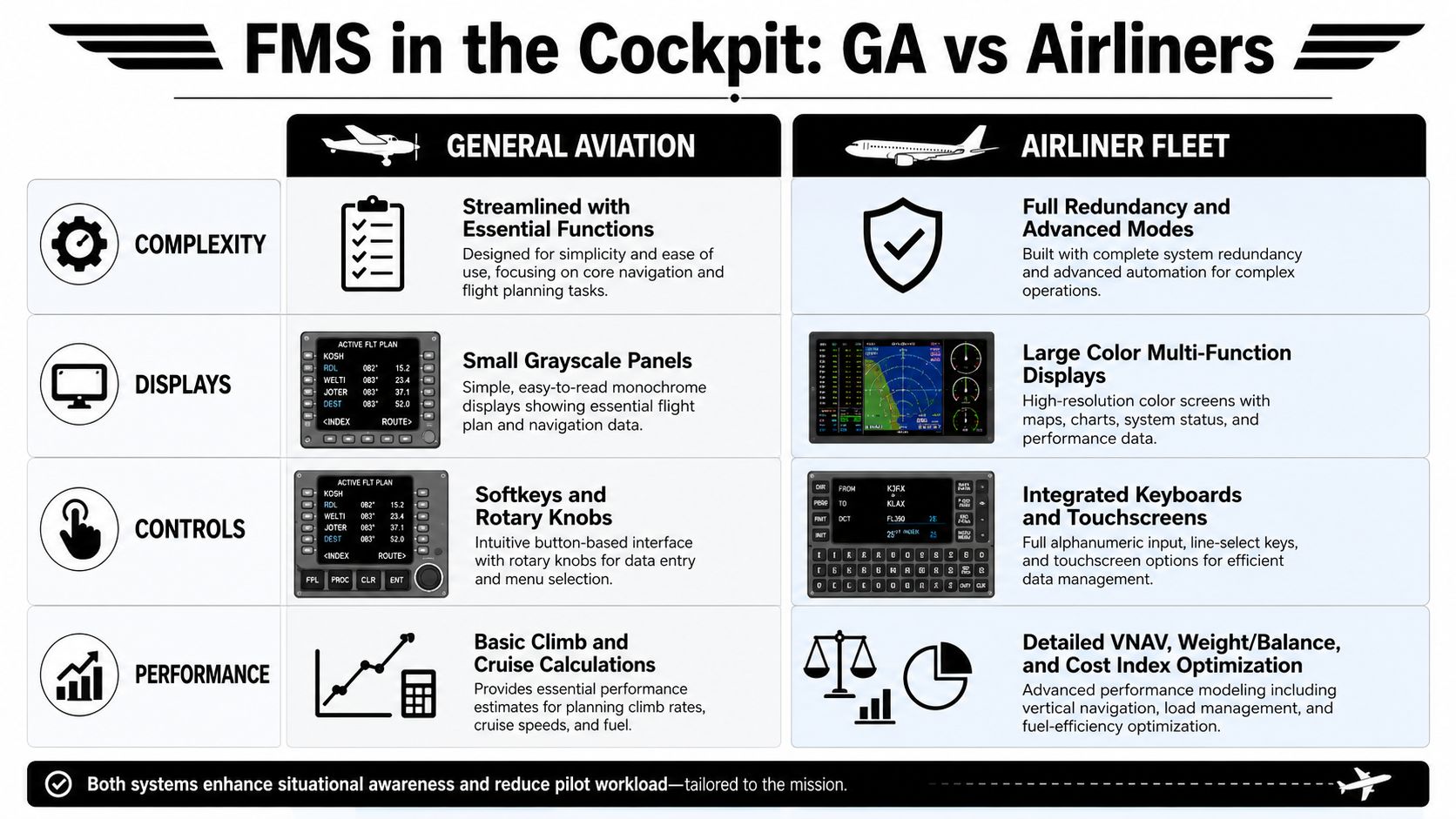
In many GA airplanes, the FMS function lives inside an integrated avionics suite or GPS navigator with a more graphical layout. The pilot often sees maps, procedure previews, and touch or knob-driven menus that feel easier to learn quickly.
That makes entry more intuitive, but it can also hide complexity. A polished display can tempt pilots into fast button pushing without a full route verification. If you've ever loaded an approach and then realized the wrong transition got selected, you've seen that issue firsthand.
For pilots comparing panel philosophies, a useful side topic is the difference between glass cockpit systems and traditional steam gauges. That transition shapes how comfortably a pilot uses FMS-driven workflow.
What changes in airliners
Airliner FMS units usually demand more structured data entry and stronger crew coordination. The interface may be less visual and more text-based, but the underlying logic is richer. The system often supports more detailed route management, more layered vertical planning, and stricter integration with company procedures and dispatch planning.
A simple comparison looks like this:
| Area | General aviation FMS | Airliner FMS |
|---|---|---|
| Interface | More graphical, often easier to browse | More text-driven and procedural |
| Pilot workload | Usually single-pilot oriented | Designed for multi-crew verification |
| Guidance depth | Strong core routing and approach support | Broader vertical and systems integration |
| Error management | Pilot catches own mistakes | Crew cross-check helps trap errors |
What stays the same
The pilot still has to verify what the system loaded. That never changes.
The FAA notes in its FMS material that advanced systems can achieve up to 4% fuel burn savings over legacy systems, and that navigation databases must be updated every 28 days under the AIRAC cycle, according to the FAA FMS assessment document. Efficiency improves, but only when data and operation stay disciplined.
That's also why many pilots look for practical automation resources outside the airplane manual. Tools that explain decision support clearly can help, and this overview of how PilotGPT improves flight safety is a useful example of how pilots are using modern tools to support better cockpit judgment rather than replace it.
Airline-style automation doesn't make you safer by itself. Standardized verification makes you safer.
Practical FMS Training and Simulator Scenarios
A lot of pilots can load a route on a calm day. That's not the standard that matters. The standard that matters is whether you can stay in command when the automation becomes confusing, incomplete, or wrong.
That's the weak spot in a lot of general aviation training. FAA data from 2024 to 2025 indicates a 35% rise in FMS-related safety reports from private pilots, yet only 12% of flight schools incorporate FMS-specific failure drills into their syllabi, as cited in the referenced training discussion. Whether or not a pilot flies behind a Garmin panel, a GTN, or another integrated system, the training lesson is the same. Normal operation is only half the job.
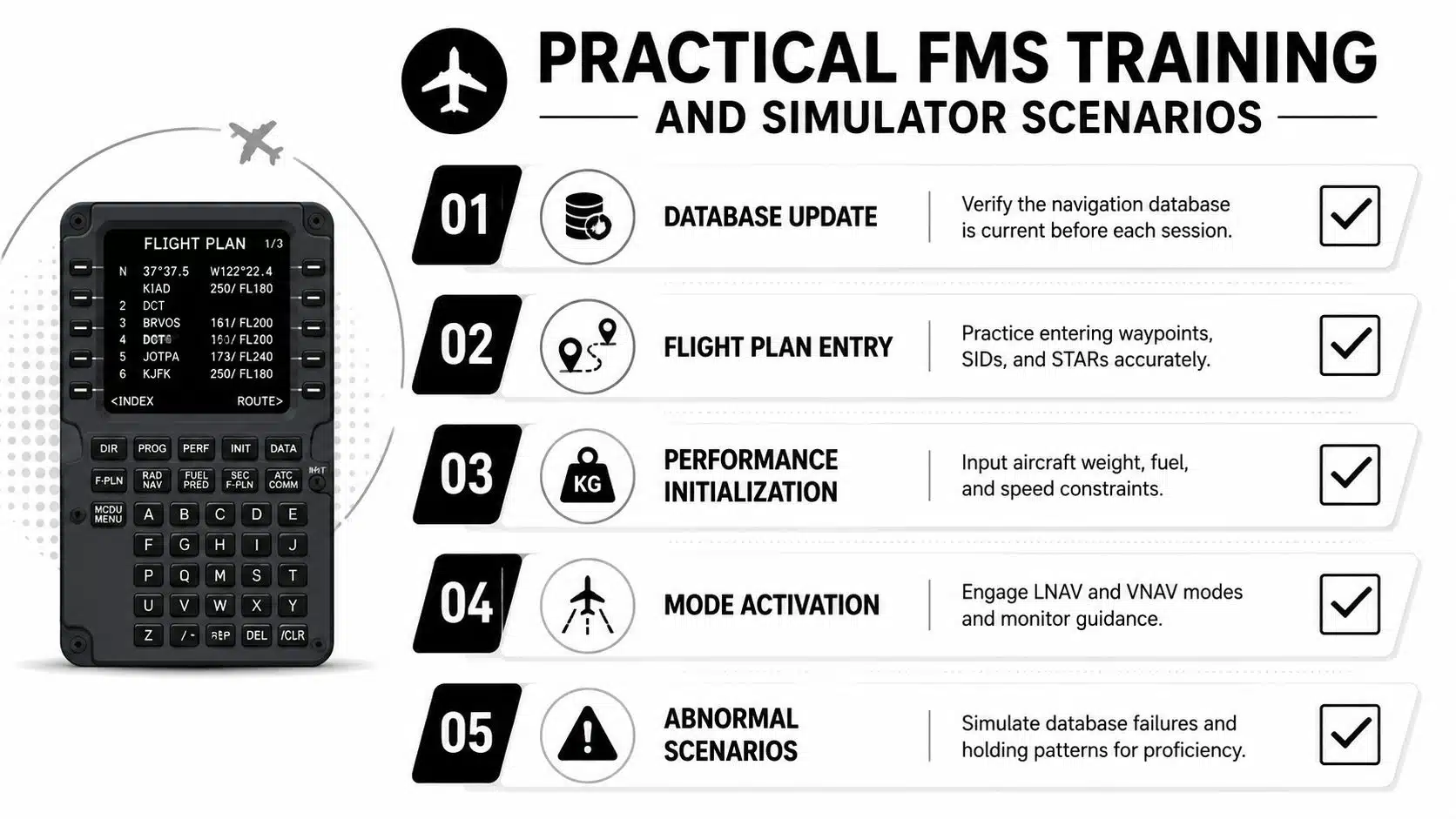
Scenarios that build real proficiency
The right simulator session should make you uncomfortable in productive ways. Not chaotic. Not unrealistic. Just demanding enough that you have to think instead of recite.
Use scenarios like these:
Cold-start route build on the ground
Enter a full IFR route, departure, arrival, and approach from scratch. Then verify every waypoint, altitude, and leg sequence against the chart before engine start.In-flight reroute from ATC
Accept a route amendment in cruise. Reprogram without losing situational awareness, and brief what changed before executing.Database mismatch or suspect waypoint
The instructor inserts a route conflict or mismatch. Your task is to catch it, reject bad assumptions, and revert to raw data or chart verification.Autopilot disengagement during a high-workload phase
Hand-fly while preserving the route picture, revealing whether students were monitoring the system or merely watching it.Approach transition change late in the arrival
Load and activate the change cleanly, then confirm the airplane won't sequence into something you didn't intend.
What you should say out loud
One of the best anti-automation habits is verbal discipline. In simulator training, say the following out loud before major mode changes:
- What route is active
- What lateral mode is armed or active
- What vertical mode is armed or active
- What the next fix and restriction should be
- What your backup plan is if the box misbehaves
That sounds simple, but it exposes confusion fast.
Don't practice until the button sequence looks smooth. Practice until a failure doesn't take your attention away from flying the airplane.
Build training modules around failure, not just flow
A lot of schools have checklists for normal avionics use but weaker structure for abnormal automation events. If you're helping build lesson plans or study material, this guide on creating structured training modules offers a useful framework for turning scattered practice items into repeatable training.
For pilots doing recurrent work, simulator sessions are the best place to build that discipline because mistakes stay inexpensive and memorable. Practicing in an instrument training simulator gives you room to freeze, debrief, reset, and repeat the exact scenario until your response becomes organized instead of reactive.
A Pilot's Guide to Safely Buying an Airplane
Pilots who get comfortable with advanced avionics often start thinking about ownership. That might mean buying an airplane for personal travel, a trainer for time-building, or even a helicopter for specialized operations. The buying process deserves the same mindset you'd bring to IFR flying. Slow down, verify details, and don't let excitement outrun judgment.
The first rule is document discipline. Before taking possession, buyers must verify that critical records are available and in order, including the Airworthiness certificate, engine and airframe logbooks, and the FAA-approved aircraft flight manual, according to AOPA's guidance on buying used aircraft.
The safest way to buy an airplane
A safe purchase usually follows a straightforward sequence.
Start with a written agreement: State laws require written contracts for aircraft purchases over $500, and the agreement should spell out aircraft identity, price, deposit, and what happens if discrepancies appear during inspection, based on Flying411's aircraft buying guidance.
Use escrow and a title search: Buyers should use a title or escrow company to check for liens and defects in the FAA record before closing, and funds should go through that service rather than directly to the seller, as explained by Piper Owner Society's pre-purchase advice.
Insist on an independent pre-buy inspection: The pre-purchase inspection is the most important safety step, and it should be done by a mechanic or shop the buyer chooses, not the seller's mechanic, according to Aviation Consumer's buyer protection guidance.
What to review in the records
Logbooks tell the airplane's story, but only if you read them critically. Missing entries, vague wording, or long gaps in documentation deserve follow-up.
A smart records review includes:
- FAA Form 337s: Major repairs and alterations can affect value, insurability, and structural confidence. Plane & Pilot's buying tips specifically recommends ordering these records.
- Geographic history: Coastal operation can be a corrosion clue.
- Avionics and accessory status: You want to know what's installed, what's aging out, and what may require near-term replacement.
Don't skip the flight and closing steps
After the static inspection, fly the aircraft yourself if possible. Some issues only appear when the machine is operating in the air. A smooth ramp impression doesn't guarantee a smooth airplane.
At closing, registration paperwork matters too. Buyers should submit FAA Form 8050-1, the bill of sale, and a $5 check to the FAA registry rather than relying on the seller's old certificate, as noted in the earlier aircraft purchase guidance.
If you're selling instead of buying, the same discipline protects you. Organized records, complete logs, accurate equipment lists, and transparent maintenance history make the transaction cleaner and safer for both parties.
Conclusion Your Path to FMS Mastery
Flight management systems reward pilots who think clearly. They punish pilots who assume. This is the essential lesson.
An FMS can build routes, manage guidance, and support efficient flight with a level of precision earlier generations of pilots didn't have. It can reduce workload, help organize an IFR flight, and make complex procedures more manageable. But none of that changes the chain of command in the cockpit. The pilot still has to verify the route, monitor the active modes, catch bad data, and revert to basic flying when needed.
That's why the strongest FMS training doesn't stop at loading procedures on the ground. It includes reroutes, wrong entries, database questions, mode confusion, and autopilot failures. A pilot who can recover from those events has actual automation proficiency. A pilot who can only make the magenta line appear has familiarity, not mastery.
The same mindset applies outside the cockpit. If you're thinking about buying or selling airplanes and helicopters, the safe path is the disciplined path. Review documents carefully. Use independent inspections. Protect the money and title process. Aviation rewards pilots and owners who verify first and commit second.
If you're working toward an instrument rating, commercial certificate, or a future airline cockpit, flight management systems aren't a side topic. They're part of the job. Learn the system well, but don't worship it. Understand what it's doing, question what looks off, and always keep your raw flying skills close at hand.
DuBois Aviation offers personalized airplane and helicopter training, simulator instruction, and advanced avionics experience for pilots who want to build real proficiency, not just pass a checkride. If you're ready to sharpen your IFR skills, improve your automation management, or continue toward commercial and multi-engine goals, explore training options at DuBois Aviation.


