
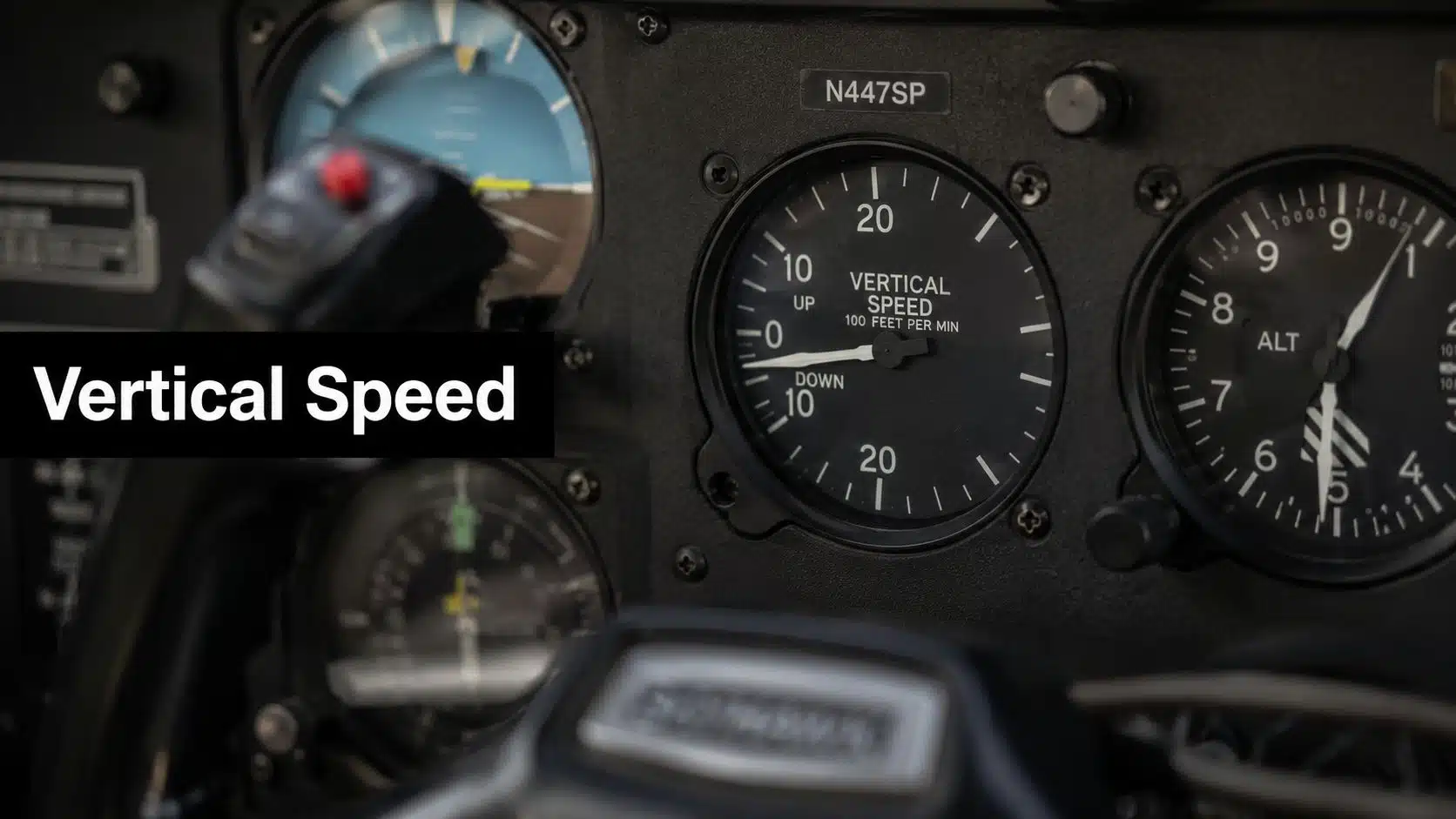
You're probably seeing the same thing I see with a lot of student pilots at Chino. The airplane is lined up well, the runway is right there, and then the descent starts to wander. You correct a little late, add power, take some out, chase the picture, and by short final the approach feels busy instead of calm.
That's usually not a hand-skill problem first. It's an information problem.
A pilot who understands the Vertical Speed Indicator stops guessing about whether the airplane is sinking too fast, climbing away from the glidepath, or leveling off early. The instrument gives you a clean read on the rate your altitude is changing, not just where you are right now. For student pilots and renters flying around a busy towered airport like KCNO, that matters on departures, pattern work, instrument training, and stabilized approaches.
The Instrument That Measures Your Rate of Climb
A student turns final at Chino, sees the runway threshold sliding up in the windshield, and realizes the airplane is getting low faster than expected. The altimeter is moving, but not in a way that feels easy to manage in the moment. By the time the trend is obvious, the correction is already late.
That's where the Vertical Speed Indicator earns its place in the panel.
Why altitude alone isn't enough
The altimeter tells you where you are. The vertical speed indicator tells you how fast that altitude is changing. Those are different jobs.
If you're descending toward final and your VSI shows a stable descent, you can hold a more consistent profile instead of waiting for the altimeter to confirm what your body already suspects. The same idea applies after takeoff. You don't just want to know that the airplane is climbing. You want to know whether the climb rate matches what you intended.
A smooth flight path usually starts with a stable rate, not a last-second correction.
At Chino, students feel this quickly because the environment is busy. You're managing radio calls, spacing, traffic, runway assignment, and power changes. A good scan turns the VSI into a practical control tool, not just another gauge in the six-pack.
What student pilots usually get wrong
Most confusion falls into three buckets:
- They treat the VSI like an altitude instrument. It isn't. It shows climb or descent rate.
- They stare at it too long. It supports the scan. It doesn't replace attitude, outside references, or the altimeter.
- They expect it to react instantly and perfectly. A traditional VSI has lag, so you have to interpret it correctly.
If you're flying a Cessna 150, a Piper Cherokee, or working toward helicopter proficiency in the local area, learning this instrument well makes the airplane feel more predictable. That's the ultimate reward. You stop reacting late and start flying ahead of the airplane.
How the Vertical Speed Indicator Works
On a departure from Chino, you rotate, set your climb attitude, and glance inside. The altimeter may barely have started to move, but the VSI is already reacting. That early response is what makes the instrument useful in a busy training environment, especially when you are balancing pitch, power, centerline tracking, and radio calls.
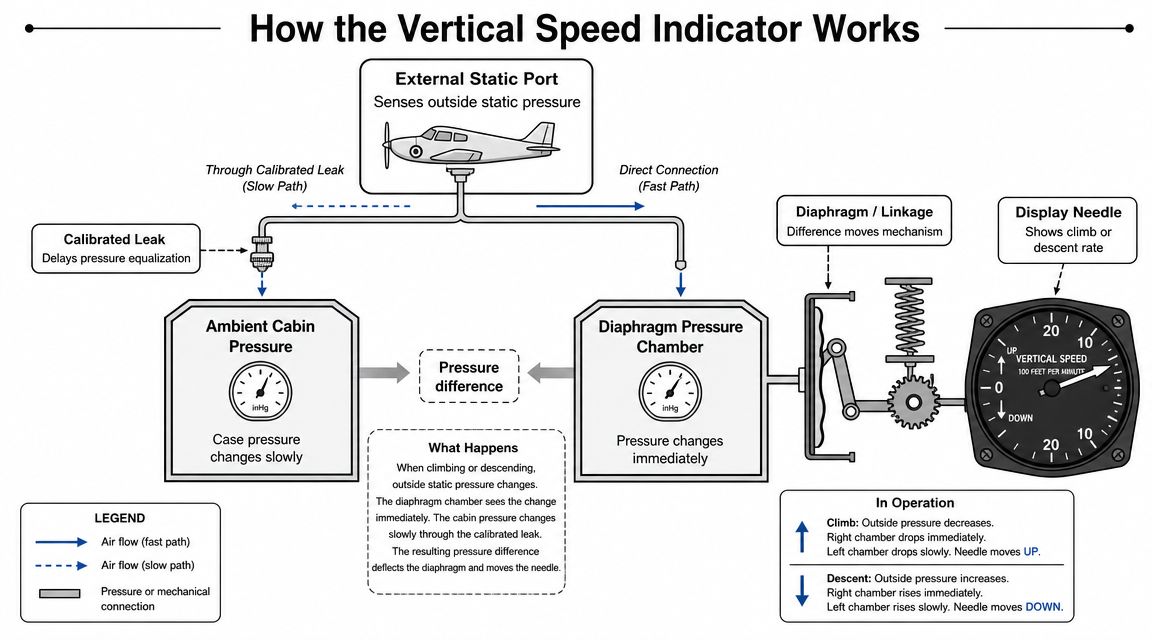
The Vertical Speed Indicator is part of the static system. It shows how quickly altitude is changing by sensing a pressure difference over time, then displaying that change in feet per minute.
A simple mechanical picture
A traditional mechanical VSI has two places where static pressure acts. One is the instrument case. The other is a diaphragm inside the instrument. Both connect to the aircraft's static source, but they do not change pressure at the same speed.
The reason is a small calibrated leak in the case. Static pressure can enter that side only gradually. The diaphragm side responds more directly, so for a brief moment the pressures are different. That temporary difference moves the linkage and deflects the needle.
In a climb, outside static pressure drops. The diaphragm senses that drop before the case fully catches up, and the needle moves up. In a descent, outside static pressure rises, the pressure relationship reverses, and the needle moves down.
A good shop analogy is two buckets being filled through different-size hoses. If one bucket changes level faster than the other, the difference between them tells you that something is changing, and how quickly.
Why the calibrated leak matters
Students often hear the word "leak" and assume the instrument is broken. Here, the leak is intentional. Without it, both sides would equalize too quickly and the instrument would not show vertical speed in a useful way.
That delay is the whole mechanism.
The VSI does not measure altitude directly. It measures how fast the static pressure is changing, which is why it can show a climb or descent trend before the altimeter gives you a satisfying confirmation. In the airplane, that means the instrument helps you catch whether your pitch change is producing the result you wanted.
Here is the cockpit meaning:
- Needle above zero shows a climb
- Needle below zero shows a descent
- Needle near zero shows little or no sustained vertical change
What the markings mean in practice
Most VSIs are marked in hundreds of feet per minute. In the trainers student pilots rent, that usually means small needle movements matter more than they first appear to.
A steady 500 feet per minute descent on approach is very different from a wandering needle that swings between shallow and steep rates. At DuBois Aviation, that difference shows up quickly in pattern work. The student holding a stable rate usually looks calmer, sounds calmer on the radio, and arrives at each point in the pattern with more time to think.
This is also why instructors ask for a specific rate instead of just "start going down." A target rate gives you something concrete to hold, whether you are climbing after departure or descending to pattern altitude.
Traditional VSI versus IVSI
A traditional VSI reacts with a built-in delay because of the same pressure timing you just read about. Some aircraft use an instantaneous vertical speed indicator, or IVSI, which adds a system that helps the indication respond faster during changes.
If you move from an older round-dial trainer into a more advanced rental aircraft, the display may feel quicker and more sensitive. The basic idea stays the same. The instrument is still using pressure change to show vertical speed. The difference is that the indication reaches a useful answer sooner, which can make the airplane feel easier to read during transitions.
Interpreting VSI Lag and Common Errors
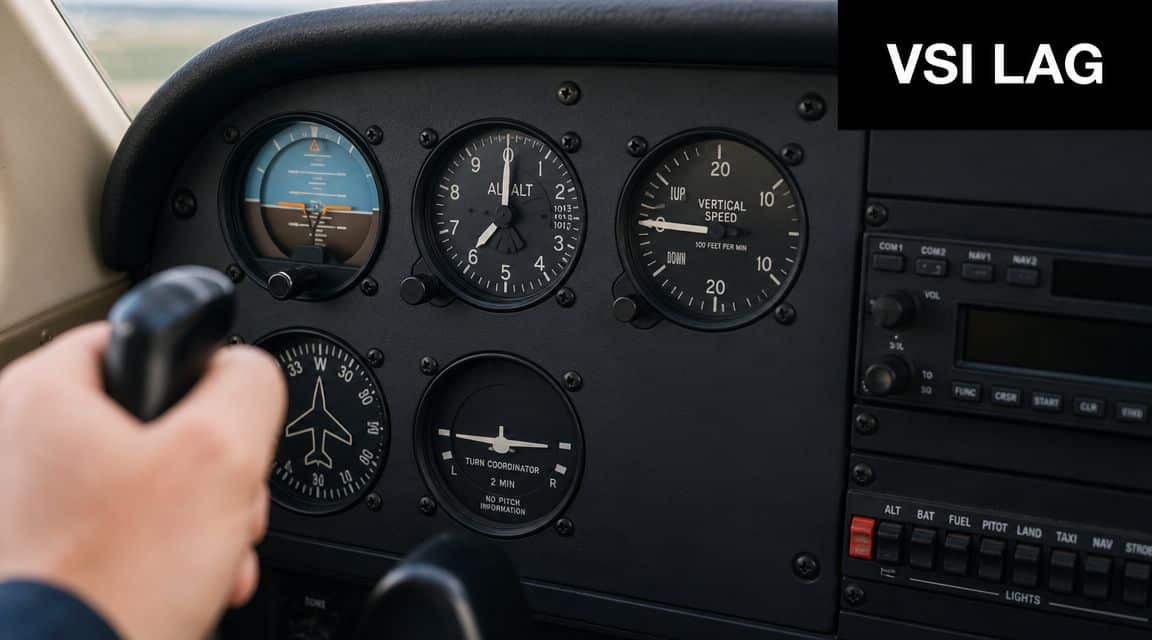
On a first few lessons out of Chino, this happens all the time. You rotate, pitch for the climb, glance at the VSI, and the needle seems late. The instrument usually is not failing. It is showing you a result through a built-in delay.
The Pilot's Handbook of Aeronautical Knowledge chapter on flight instruments explains the difference between trend and rate. That distinction matters in the cockpit. The VSI often gives you an early hint that the airplane has started climbing or descending, but the final number takes a moment to settle.
Trend first, rate second
A good way to understand VSI lag is to compare it to watching a cup fill under a faucet. You can tell right away that water is flowing, but it takes a little time to judge the steady fill rate. The VSI works in a similar way. It starts hinting at up or down before it fully settles on the climb or descent rate.
That is why a quick glance right after takeoff can mislead a student pilot. If you are departing Chino, cleaning up the airplane, talking to tower, and trying to hold Vy, the VSI is only one piece of the picture. Use it as an early cue for direction. Then give it a moment while you hold attitude and airspeed.
A simple cockpit rule helps. Use the first movement for direction. Use the stabilized indication for the actual rate.
Students get into trouble when they chase the needle. They pitch up, do not see the number they expected, pull a little more, and then the VSI catches up. Now the nose is too high, the airspeed starts bleeding off, and the airplane is no longer trimmed for a normal climb. The same mistake shows up on descent. A pilot wants 500 feet per minute on downwind or base, sees only a shallow indication at first, pushes more, and ends up high-workload and unstable.
Where lag causes errors
Lag by itself is normal. The actual problem is what the pilot does next.
The most common errors look like this:
- Chasing the needle after a pitch change
- Using the VSI as the primary tool for level-off
- Treating turbulence bumps like real vertical trends
- Ignoring a mismatch between the VSI and the rest of the panel
At a busy towered airport, these mistakes stack up fast. A student in the Chino pattern is already managing spacing, radio calls, checklists, and traffic. If that student fixates on the VSI, attention leaves the outside picture and the airplane starts wandering.
When the VSI helps, and when to be cautious
The VSI earns its keep when the airplane is already close to stable. That includes settling into a normal climb, holding a planned descent, or keeping an approach profile from drifting. In those moments, the instrument acts like a fine-tuning tool.
It is less reliable as a stand-alone guide during abrupt changes. Quick pitch corrections, gusts, and level-offs can all produce indications that are technically real but not useful by themselves. A bump can flick the needle enough to tempt a correction you never needed.
That is why instructors at DuBois Aviation often coach students to pause before reacting. If the airplane attitude is correct and the airspeed is where it should be, give the VSI a second instead of making a second control input.
Common error modes
Some VSI problems come from pilot technique. Some come from the instrument or static system.
Here is a practical way to sort out what you are seeing:
| Symptom | Likely cause |
|---|---|
| Needle responds slowly after a change | Normal lag in a traditional VSI |
| Needle jitters in rough air | Pressure fluctuations from turbulence |
| Indication does not fit the attitude or altimeter | Static system issue or calibration error |
| Strange indication during maneuvering | Temporary turning or acceleration-related error |
For a renter or student pilot, the key point is simple. If the VSI story does not match what the airplane feels like and what the other instruments show, stop trying to force the airplane to satisfy one gauge.
A quick cockpit check
When the indication looks odd, ask yourself:
- Did I just make a pitch or power change?
- Am I in bumps or wake turbulence?
- Does the attitude indicator and altimeter support this reading?
Those three questions keep you from overcontrolling.
A practical drill works well in training. On climb-out or on a practice descent, make one small pitch change and then keep your hands quiet for a moment. Watch how long it takes the VSI to move, then how long it takes to settle. Students at DuBois Aviation usually get more comfortable with the instrument once they see that delay on purpose instead of being surprised by it in the pattern.
A good pilot does not obey the VSI. A good pilot interprets it.
Cross-Checking the VSI for Situational Awareness
Good instrument use isn't about picking a favorite gauge. It's about building a picture that makes sense.
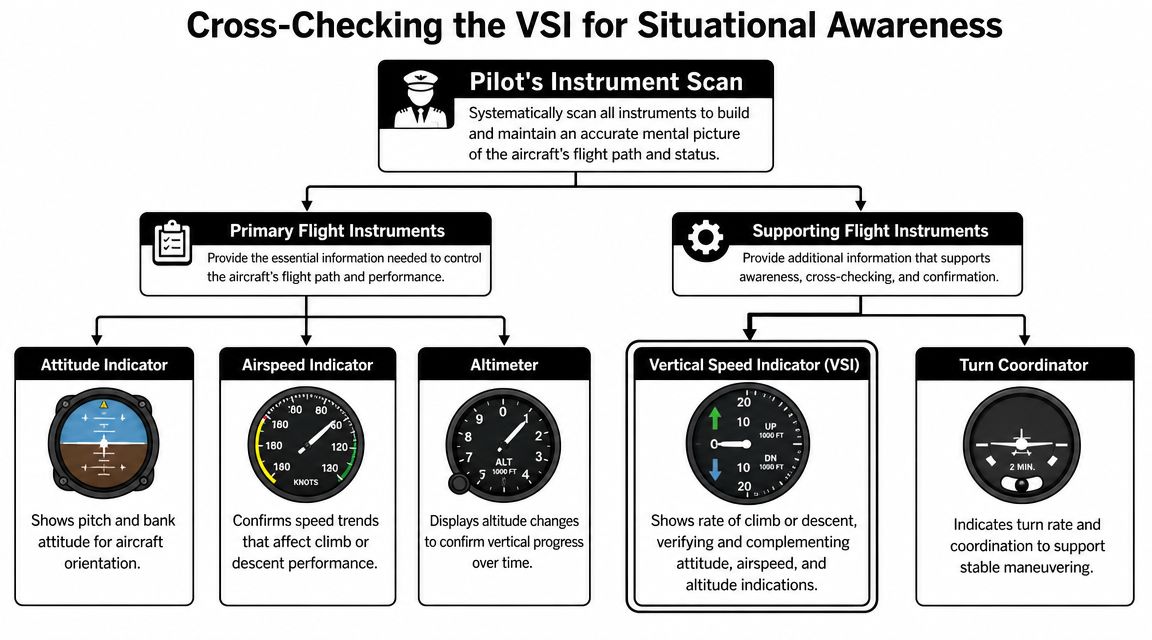
The VSI becomes far more useful when you connect it to the attitude indicator and altimeter. That's the heart of cross-checking. One instrument shows what you're commanding, another shows where you are, and the VSI helps confirm what the aircraft is doing in between.
The three-instrument story
Here's a simple example from training.
You raise the nose slightly after departure. The attitude indicator shows the pitch change right away. The altimeter may still look almost steady at first. The VSI starts to show an upward trend, which tells you the aircraft has begun translating that pitch attitude into a climb.
That sequence matters because it keeps you ahead of the airplane instead of waiting for a delayed result.
A scan that works in busy airspace
At a place like Chino, your attention gets pulled in several directions at once. You're listening to tower, looking for traffic, managing spacing, and flying the airplane. A clean scan keeps the panel organized.
Try this mental model:
- Attitude indicator for command. What attitude did I set?
- VSI for trend. Is the airplane starting up, down, or level?
- Altimeter for confirmation. Is altitude changing as expected?
Don't ask one instrument to do three jobs.
What this looks like on approach
On final, suppose your sight picture says you may be drifting low. A quick scan helps:
- The attitude indicator shows whether the nose has dropped.
- The VSI shows whether the descent rate has increased.
- The altimeter confirms the ongoing altitude loss.
That's how you make a small correction early instead of a big one late.
Cross-check versus fixation
Students often fixate on whichever instrument feels easiest to interpret. Some stare at the altimeter. Others stare at the VSI because the needle movement feels intuitive.
Neither habit works well. The altimeter can be slow to reveal a trend. The VSI can exaggerate a temporary change. Used together, they become much more reliable.
A pilot with good situational awareness is always asking, “Do these instruments agree?” When they do, your workload drops. When they don't, you know to investigate before making a large control input.
Practical VSI Techniques for Every Flight
A student departs Chino, gets a quick instruction from tower, glances back inside, and sees the VSI creeping upward. The useful question is not, "What exact number do I have right now?" The useful question is, "Is the airplane doing what I asked it to do?"
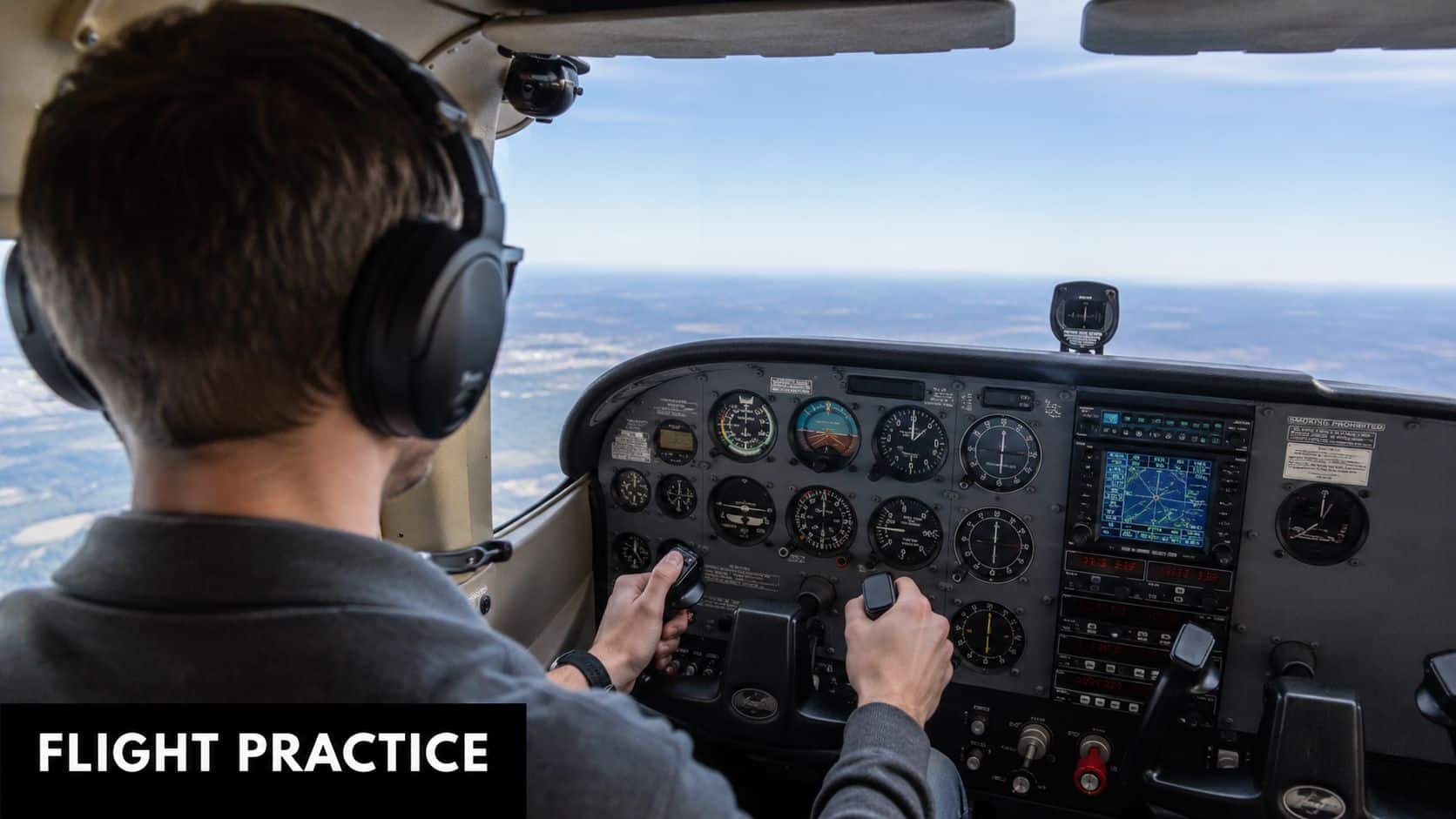
That is how I teach the VSI to student pilots and renters at DuBois Aviation. Treat it like a trend coach. It does not fly the airplane for you. It confirms whether your pitch and power changes are producing the climb, descent, or level-off you expected.
After takeoff in a Cherokee
In a Piper Cherokee out of KCNO, the first job is still outside. Hold the climb picture you were taught, keep the airplane coordinated, and confirm airspeed. Then glance at the VSI to make sure the vertical trend is building the way it should.
Use a simple cockpit routine:
- Set the attitude. Start with the outside sight picture and known pitch attitude.
- Verify the trend. Check for a positive indication on the VSI.
- Trim for relief. Once the climb is steady, trim so your hand pressure gets lighter.
Students often get in trouble by staring at the needle too soon. The VSI is a little like a friend who answers half a second late. If you poke at the controls every time it moves, you create the very instability you are trying to fix. Set the attitude, wait briefly, then make a small correction if the trend is still off.
Building a stabilized descent on approach
Approach work at Chino gets busy fast. You may be listening to tower, watching spacing, and adjusting for traffic ahead. A good VSI habit keeps the descent organized without turning the panel into a distraction.
Start the descent early enough that you can be calm about it. Reduce power smoothly, set the pitch for the picture you want, and use the VSI to confirm that the descent is steady rather than increasing and decreasing every few seconds.
Here is the practical goal for students. Avoid chasing precision on every glance. A smooth, repeatable descent usually leads to a better approach than a needle that hits one perfect number for only a moment.
On final, consistent beats dramatic.
If the VSI shows the descent rate increasing more than expected, do not make a large correction. Use a small pitch change, then recheck. At a towered airport like KCNO, that kind of restraint matters. Small corrections help you stay ahead of the airplane while still keeping up with radio calls and traffic.
Here's a cockpit demonstration that helps many students connect the panel to what they feel in flight.
Leveling off without ballooning or sinking
Level-offs are where the VSI becomes especially practical. Many students wait until the altimeter reaches the target altitude, then push or pull too much. The airplane responds with a little balloon, a little sink, or both.
A better technique is to start easing out of the climb or descent before the target altitude arrives. Watch the VSI trend soften toward zero while your pitch picture transitions toward level flight. The altimeter confirms the result, but the VSI gives you an earlier hint that your correction is working.
This is a lot like braking a car before the stop sign instead of at the stop sign. If you wait for the last second, the correction has to be abrupt. If you plan ahead, the airplane settles where you want it.
A note for helicopter students
In a Robinson or Enstrom, the VSI can help organize approach and descent work, especially when you are still learning how small control inputs affect the whole picture. It should stay in a supporting role.
Use it as a confirmation instrument, not the boss. If the descent begins building faster than you intended, the VSI can tip you off early enough to smooth out the correction. That helps make approaches more controlled and predictable, which is exactly what student pilots need before those habits get tested in a busy airport environment.
Practice Drills in the Simulator and Aircraft
You are turning base to final at Chino, the tower is talking, traffic is ahead of you, and the airplane starts drifting below the glidepath. That is when VSI practice pays off. A student who has trained this well makes a small, timely correction and keeps the approach organized. A student who has not usually makes one late input, then another, and the whole final gets busy.
The goal of these drills is simple. Build a scan that holds up when the workload goes up.
Timed climb drill
Start with a target altitude and a target climb rate. Set the climb, trim it, and hold it long enough to notice what a stable picture looks like outside and what the instruments do after each pitch change.
Then repeat the drill with small changes. Have your instructor give you a heading change, a radio call, or a level-off amendment. At a place like Chino, that extra task is realistic. You are learning to keep the airplane under control while your attention gets pulled in more than one direction.
This drill teaches patience. The VSI does not react instantly, so you need to make a correction, wait, and confirm the trend instead of pecking at the controls.
Partial panel descent work
In the simulator, or in the aircraft with appropriate instruction, cover the attitude indicator and fly a planned descent using the remaining instruments and the outside picture when available. Use the altimeter to confirm altitude loss and the VSI to monitor the trend.
Students often discover the same problem here. They were not really scanning. They were staring at one instrument and calling it a scan.
That is why this drill works so well.
It forces you to spread your attention properly and keep the VSI in its supporting role. At DuBois Aviation, this is especially useful for renters and student pilots who want sharper instrument habits before a checkout, IPC prep, or more pattern work in a busy towered environment.
Stabilized approach challenge
Pick a point on final where the airplane should already be configured, trimmed, and descending steadily. From that point to short final, keep the outside picture primary and use brief glances at the VSI to confirm that your descent rate stays where you intended.
A good comparison is driving downhill in traffic. You do not stare at the speedometer the whole time, but you check it often enough to catch a trend before it becomes a problem.
If the VSI swings up and down on final, your control inputs are usually too large, too late, or both. After the approach, debrief one question with your instructor: when did the airplane stop feeling predictable? That answer usually points straight to the break in your scan or your pitch and power coordination.
When to use the simulator and when to use the airplane
Use the simulator for repetition. It is an efficient place to practice timed climbs, partial panel work, and level-off timing without burning Hobbs time.
Use the airplane for realism. The motion, noise, radio workload, and visual cues in the Chino pattern change how the drill feels, and that matters.
For many students, the best routine is to practice the procedure in the simulator first, then fly the same drill in the aircraft while the steps are still fresh. That is how textbook knowledge turns into a usable skill during an actual lesson, a renter checkout, or a busy arrival with the tower calling traffic.
From Renting to Owning How to Buy an Airplane Safely
You are turning base to final at Chino, the tower is moving traffic, and your descent starts to drift. The VSI shows the trend a moment before the sight picture fully makes it obvious. That is the key lesson of this instrument. It helps you catch small errors early, before they become large corrections close to the runway.
For a student pilot or renter, that matters more than memorizing a definition. The VSI is one of the best trend tools in the panel, but only if you treat it as a supporting instrument instead of a command instrument. Your eyes still lead outside in the pattern. The VSI helps confirm whether the airplane is doing what you intended.
A simple rule works well in training at a busy towered airport: set the attitude, set the power, then verify the rate. If you reverse that order and chase the needle, the airplane usually gets less stable, not more.
Here are the habits I want DuBois Aviation students to practice until they become automatic:
- In climbs, glance at the VSI to confirm the airplane is holding the rate you expected for the pitch attitude, airspeed, and power setting.
- In level-offs, use the VSI as an early cue that the climb or descent is tapering where you want it to.
- On approach, use it to verify a steady descent after the airplane is configured and trimmed.
- If the indication changes suddenly, cross-check before reacting. Look at pitch, power, airspeed, and outside references first.
That last point trips up a lot of pilots. A bouncing VSI does not always mean the airplane needs a correction right now. In light turbulence, or during a rushed pattern, the instrument can tempt you into overcontrolling. A better response is brief and disciplined. Confirm the trend, make one small correction if needed, then give the airplane time to respond.
One drill works especially well for renters and newer pilots. Pick a target descent on downwind or base, hold it with small pitch and power changes, and call out what you see: "outside picture, airspeed, VSI." Saying the scan out loud slows your thinking down and keeps you from staring at one instrument.
Another good exercise is the go-around cross-check. Add full power, set the correct pitch attitude, and watch how the VSI transitions from descent toward climb. You are not waiting for the needle before pitching up. You are using it to confirm that the airplane is developing the climb you expected. That distinction is where real instrument understanding starts.
If you are learning to fly or renting at Chino, practice with enough repetition that the VSI becomes familiar, not dramatic. Used correctly, it is a quiet instrument. It gives you early information, supports a stable scan, and helps you stay ahead of the airplane when the pattern gets busy.
DuBois Aviation supports that kind of skill-building with flight training, aircraft rental, simulator access, and a local Chino Airport environment where students can practice these habits in realistic conditions.
Continue learning: Review our instrument rating course guide and IFR currency requirements.